

 Tweet
Tweet
Hello everyone!
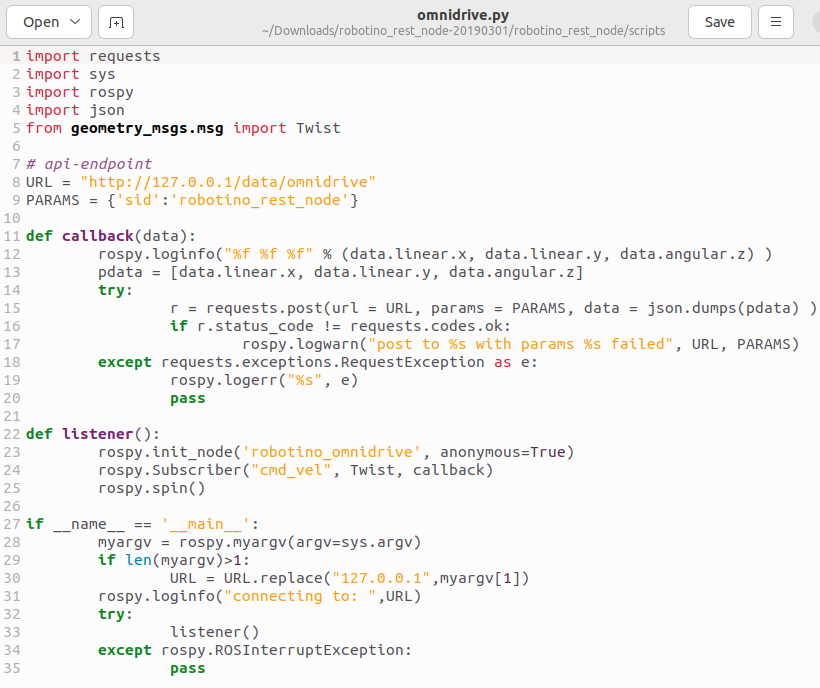
I'm experiencing a communication issue between my Robotino and my external PC while using ROS Noetic on Ubuntu 20.04. I've been testing some example scripts from the RobotinoWiki web, specifically bumper.py and omnidrive.py.
When I run bumper.py, I can successfully retrieve bumper reading data, indicating that the communication between the Robotino and the PC is working. However, when I execute omnidrive.py and send velocity messages through the cmd_vel topic, the robot doesn't move at all.
I've verified that velocity messages are being sent correctly, but it seems that the Robotino isn't responding to them as it should.
I'm wondering if there's any additional configuration that needs to be enabled in the Robotino web interface to allow motion control through the REST-API.
Has anyone experienced a similar issue or have any ideas what might be causing this behavior?
Any help or suggestions would be greatly appreciated! Thank you in advance.
I'm experiencing a communication issue between my Robotino and my external PC while using ROS Noetic on Ubuntu 20.04. I've been testing some example scripts from the RobotinoWiki web, specifically bumper.py and omnidrive.py.
When I run bumper.py, I can successfully retrieve bumper reading data, indicating that the communication between the Robotino and the PC is working. However, when I execute omnidrive.py and send velocity messages through the cmd_vel topic, the robot doesn't move at all.
I've verified that velocity messages are being sent correctly, but it seems that the Robotino isn't responding to them as it should.
I'm wondering if there's any additional configuration that needs to be enabled in the Robotino web interface to allow motion control through the REST-API.
Has anyone experienced a similar issue or have any ideas what might be causing this behavior?
Any help or suggestions would be greatly appreciated! Thank you in advance.



Comment