Problem with running omnidrive.py | ROS on robotino3

Collapse
X
 
  • Time
  • Show
Clear All
new posts
  • softdegree
    Junior Member
    • Nov 2022
    • 16

    #1

    Problem with running omnidrive.py | ROS on robotino3

    Hey

    I am currently working on setting up ROS on robotino3 and I encountered some problems with using a script within the robotino_rest_node package named omnidrive.py.
    When I run omnidrive.py on the first terminal and try to publish some data on the cmd_vel topic I get an error that says:" post to http://127.0.0.1//data/omnidrive with params {'sid': 'robotino_rest_node'} failed"

    Does anyone know what is a solution for this?
    Thank you upfront.
  • verbeek
    Administrator
    • Mar 2015
    • 242

    #2
    Your Robotino runs an old OS. You are missing the REST-API interface on Robotino. Upgrade to the latest image.

    Comment

    • softdegree
      Junior Member
      • Nov 2022
      • 16

      #3
      Thank you for such a quick answer,

      on that note, can I ask you about installing the latest image, I tried that before everything else but when I selected the boot device, official usb from robotino, nothing really happend, old OS just run.

      I copied the image file in the boot directory on the usb

      Comment

      • verbeek
        Administrator
        • Mar 2015
        • 242

        #4
        use a different USB port for the keyboard. Press F7 for boot menu.

        Comment

        • softdegree
          Junior Member
          • Nov 2022
          • 16

          #5
          I did that.

          For example
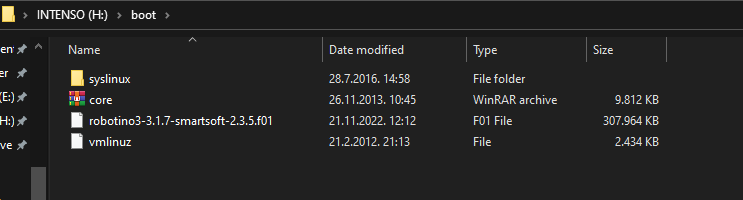
          I downloaded image: robotino3-3.1.7-smartsoft-2.3.5.f01
          Pasted that file on the usb folder "boot"
          Entered the boot menu
          Selected my usb as boot device, and nothing happened, old OS just got up

          Comment

          • softdegree
            Junior Member
            • Nov 2022
            • 16

            #6
            Click image for larger version

Name:	image.png
Views:	153
Size:	14.7 KB
ID:	13033
            do i need to remove something from it ?

            Comment

            • verbeek
              Administrator
              • Mar 2015
              • 242

              #7
              Please follow


              You can install robotino4 images.

              Comment

              • softdegree
                Junior Member
                • Nov 2022
                • 16

                #8
                Hey verbeek,

                I tried that today. Followed every step. I still have the same problem, I enter the boot menu, I choose my usb stick for the device to boot from, and it just starts the old installed ubuntu.
                I even have the video of that, I can upload it if it's necessary.

                Comment

                • verbeek
                  Administrator
                  • Mar 2015
                  • 242

                  #9
                  Please upload the video. Maybe I can see something from the boot menu entries.

                  Comment

                  • softdegree
                    Junior Member
                    • Nov 2022
                    • 16

                    #10
                    Here you go, I uploaded it on youtube: https://youtu.be/SGRYgkbL42I

                    Comment

                    • verbeek
                      Administrator
                      • Mar 2015
                      • 242

                      #11
                      Youtube: The video is not available any more

                      Comment

                      • softdegree
                        Junior Member
                        • Nov 2022
                        • 16

                        #12

                        ://m.youtube.com/watch?v=SGRYgkbL42I

                        title of the video is: Trying to boot robotino 3

                        Comment

                        • verbeek
                          Administrator
                          • Mar 2015
                          • 242

                          #13
                          When you select your usb stick it just resets and the starts the OS from the internal mSata disk.

                          Why is it doing this? First, I think your BIOS battery is dead. Please install a new battery on the Robotino base board. Then try again.

                          Comment

                          • softdegree
                            Junior Member
                            • Nov 2022
                            • 16

                            #14
                            You were right about BIOS battery. I changed it and managed to install new OS.
                            But now the new problem is when running: roslaunch robotino_node robotino_node.launch

                            I get message:
                            [ERROR] [1669292448.345472424]: LaserRangeFinder0 :
                            [ERROR] [1669292448.361515337]: Odometry :
                            [ERROR] [1669292448.418020406]: RobotinoNode :
                            [ERROR] [1669292448.595185592]: Camera0 :​
                            [ INFO] [1669292450.294748775]: Odometry disconnected from Robotino.
                            [ INFO] [1669292450.312024054]: LaserRangeFinder0 disconnected from Robotino.
                            [ INFO] [1669292450.317996018]: RobotinoNode disconnected from Robotino.
                            [ INFO] [1669292450.695068236]: Camera0 disconnected from Robotino.


                            There is no error from beginning of the post, ROS is saying that messages are publishing, but robot is not moving.

                            Comment

                            • verbeek
                              Administrator
                              • Mar 2015
                              • 242

                              #15
                              Is the REST API running? Try it directly with your web browser

                              http://robotinoip/data/analoginputarray

                              Comment

                              Working...